

Identifying Apple II Cards

One of the most innovative features of Steve Wozniak‘s 1977 Apple II computer hardware design was the inclusion of a set of peripheral card slots on the computer’s motherboard. Printed circuit boards (‘cards’) inserted into these slots extended the functionality of the Apple II family of computers.
Apple and other companies designed and sold cards that provided features that the base Apple II computer did not include, e.g: printer and modem interfaces, extra memory, system clocks, larger displays, disk drive controllers, audio synthesizers and even other processors (such as the Z80 CPU – allowing Apple II computers to run CP/M software). In was only in 1984, with the release of the Apple IIc computer, that Apple finally included built-in hardware to support common functions such as printing, modem access, 80-column text display and a floppy disk interface.
To deliver their functionality, cards (in most cases) needed to interact with software running on the Apple II. To facilitate the interface between card hardware and computer software the Apple II assigned memory in the $C000 - $CFFF range of the Apple II memory map for use by each inserted card. The card designer could include a ROM (Read Only Memory) chip on the card containing software (referred to as ‘firmware’) that would use that card’s assigned memory when the card was installed into an Apple II slot.

This is the ThunderClock Plus card, released in 1980 by Thunderware Inc. of Orinda California. This card added a real-time clock to the Apple II and included an on-card battery to maintain time when the computer was turned off. The large integrated circuit in the bottom right of the card is the ROM chip.
In 1981, to support the release of Apple Pascal version 1.1, Apple created the Pascal 1.1 Firmware Protocol which formalized the use of specific ‘ID’ bytes within a card’s firmware to identify the card to software running on the Apple II. These firmware bytes could identify the class of card (e.g. a printer interface card) as well as more specific card information such as its name and manufacturer. If card manufacturers followed the protocol (unfortunately many did not), software running on an Apple II could check each of the 7 peripheral card slots and detect what card was in each occupied slot.
In 2023 I wrote Card Cat in Apple II UCSD Pascal and 6502 assembly language. Card Cat scans the Apple II peripheral slots, determines whether a slot contains a card, and, when possible, analyzes firmware mapped into the $C000–$CFFF peripheral address space. It compares identifiable firmware against its built-in database of known card signatures. For cards without identifiable firmware, Card Cat uses additional probing methods to observe hardware behavior and infer the card’s identity. The goal is to create a comprehensive, curated catalog of Apple II peripheral cards.The list of cards identified by Card Cat is here.
In addition to identifying peripheral cards, Card Cat also reports core information about the Apple II system it is running on. It identifies the computer model, processor, installed memory, display configuration, startup slot, and other built-in hardware features when they can be determined. This gives users a concise snapshot of both the host computer and the expansion cards installed in it.

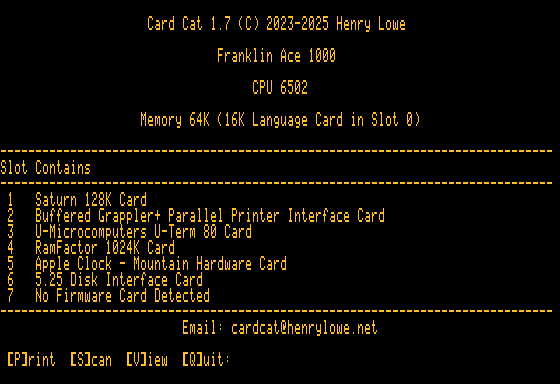
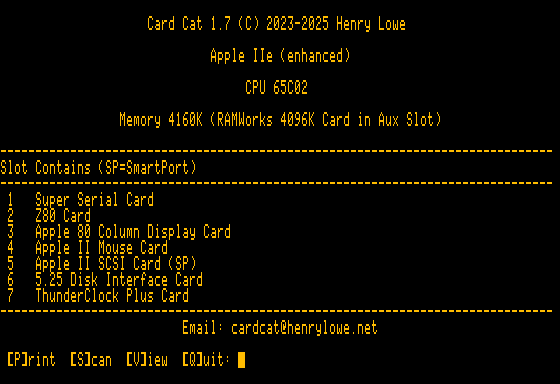
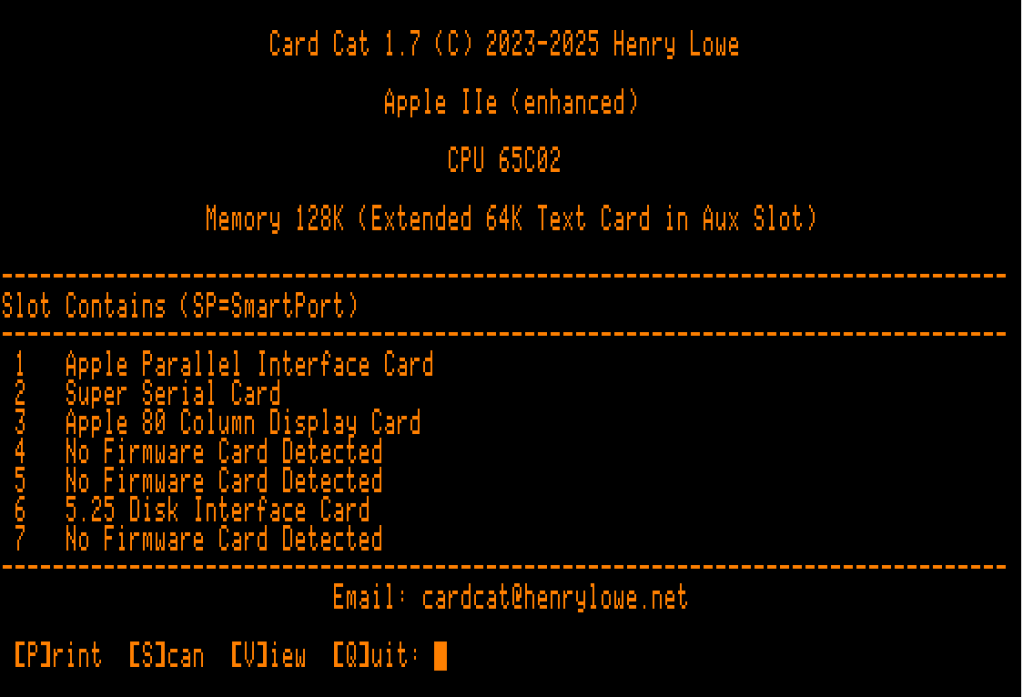
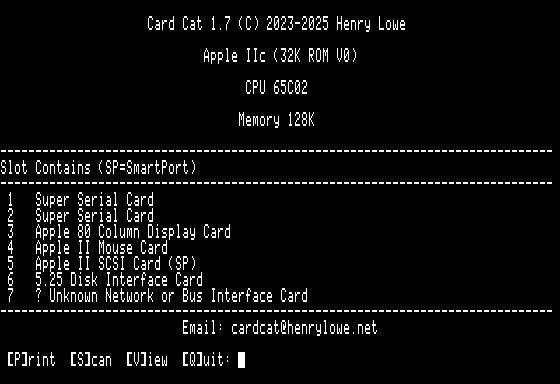
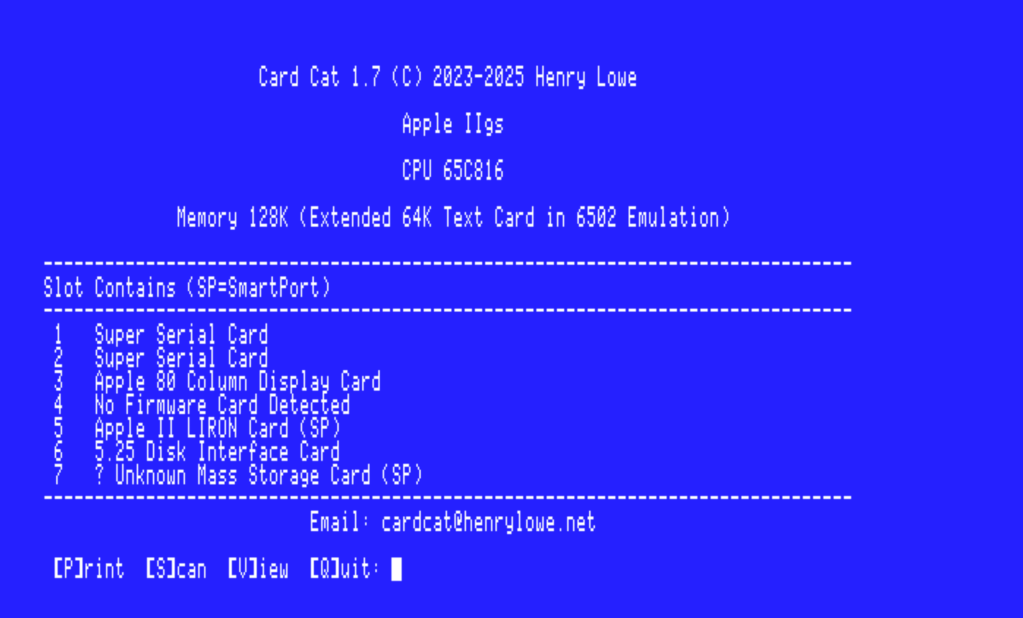
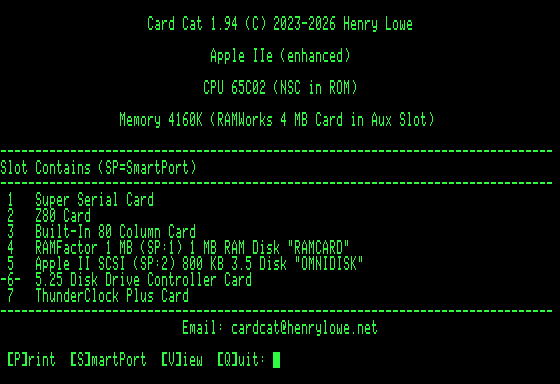
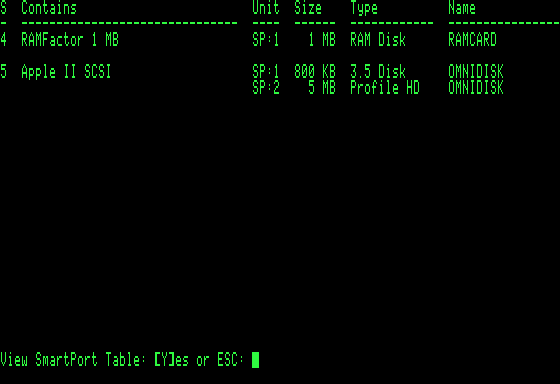
Card Cat 1.94 (released June 2026) added SmartPort detection. If the computer contains a card that is SmartPort-enabled, Card Cat will display the number of connected devices and information about the first connected device in-line with the slot’s Card listing. When at least one SmartPort-enabled card is present, the Card Cat menu contains a “[S]martPort” menu item. Selecting this command displays a table of installed SmartPort-capable cards and the first two attached devices.
Note: On the Apple IIGS if slot #5 is configured to “Smart Port” and that slot contains a card that is not SmartPort-enabled then Card Cat may crash when trying get the card’s SmartPort info. The quick fix is to set slot #5 to “Your Card” using: GS-OS Control Panels -> Slots -> Slot #5 -> “Your Card”.
Installing and Using Card Cat
Card Cat is provided as a turn-key boot disk in two formats: a 140 KB 5.25-inch disk image (.dsk) and an 800 KB ProDOS-ordered disk image (.po). It can boot from Drive 1 in slots 4, 5, or 6 and requires a minimum of 64K of memory, the boot slots and required system RAM are limitation of Apple II UCSD Pascal.
Mount the Card Cat disk image in an emulator, or write it to a physical disk and boot it from Drive 1. Card Cat will determine whether the Apple II has a 40- or 80-column display and adapt accordingly. The program first displays basic information about the computer it is running on, followed by information about the installed peripheral cards. Card Cat has been tested on an Apple II+, Franklin Ace 1000, Apple IIe, Apple IIc emulation, and Apple IIgs emulation.
Card Cat examines the peripheral card slots , producing one of 4 results:
- If a card with firmware is found and the card is in Card Cat’s built-in database, the card’s name and slot number are displayed.
- If a card with firmware is found but the card is not in Card Cat’s database, the program will attempt to identify the type of card using information derived from the card’s firmware. It then displays the suggested card type and the slot it occupies. For example, it might display ‘? Unknown Network or Bus Interface Card‘ as the suggested card type. If the card type cannot be determined, Card Cat will display ‘Unknown Card’.
- If the slot appears to be occupied by a card that does not contain firmware, Card Cat will use custom code to check for the presence of a Z80 card, MockingBoard card, Uthernet II card, ESP32 SoftCard or Saturn-compatible RAM card in that slot. If detected, Card Cat will display the name of the card.
- If none of these non-firmware cards are detected Card Cat will display ‘No Firmware Card Detected‘.
After displaying these results in the slot table, Card Cat offers 4 menu options:
- [P]rint: If you have a printer connected to the Apple II, this command will print a copy of the computer information and the slot table.
- [S]martPort: Displays a table of all SmartPort-capable cards installed and information about the first two connected devices.
- [V]iew: Displays a listing of the hexadecimal and printable ASCII character value of the first 256 bytes of memory (
Cn00 - CnFF) reserved for the selected card slot (n). The displayed values are typically the first 256 bytes of the card’s active firmware but, if the card has no firmware, it will display random ‘phantom’ values. This command is provided to help identify potential firmware signature bytes for cards not recognized by Card Cat. If you have a card that is not identified please email a description of the card and a photo of this ROM view to me at: cardcat@henrylowe.net. - [Q]uit – Quit Card Cat and reboot from another system disk.
Using Card Cat:
- Download the Card Cat disk image file (link at the end of this page).
- If necessary, decompress the downloaded .zip file.
- Copy the Card Cat disk image to a floppy disk using ADTPro or copy the Card Cat disk image to an Apple II disk drive emulator.
- Use the Card Cat startup disk to boot an Apple II,II+,IIe,IIc or IIgs (or clone).
- Card Cat will automatically scan slots 0-7 and display any cards that it recognizes.
- If Card Cat fails to recognize a card or misidentifies a card, use the ‘[V]iew‘ command to display that slot’s (1-7) firmware data and email a photo of the screen to cardcat@henrylowe.net along with any information that you have about the card.
Card Cat 1.94 (Released June 5, 2026)
New card detections
Card Cat now detects a number of additional cards:
- A2RetroNet / A2Pico
- Apple High-Speed SCSI
- Apple II Graphics Tablet Interface
- Applied Engineering PC Transporter
- CPS-Laser Universal Disk Controller
- Epson APL Parallel Printer
- FujiNet
- GR32 Adaptive Firmware
- PCPI Applicard
- SoftSP
- Songtai Chinese System
- TYMAC PPC-100 Parallel Printer Interface
- XDrive
System and firmware detection improvements
- Identifies the built-in 80-column display hardware on the Apple IIe and IIc.
- Identifies the slot containing the startup disk, displayed as
-N-, whereNis the slot number. - Improves detection of non-firmware cards installed in slot 3 on the Apple IIe.
- Adds identification of Laser 128 card firmware.
Display and formatting improvements
- Standardizes memory and storage size units using
KB,MB, andGB. - Fixes various UI glitches.
- Adds a brief startup reminder that
Control-Atoggles between the two halves of a virtual 80-column display on 40-column systems.
Reliability fixes
- Fixes a bug that could crash the app on computers using a 40-column display.
Preliminary SmartPort support
Card Cat 1.94 adds preliminary support for SmartPort device detection:
The SmartPort command displays a full-screen table of all SmartPort-enabled cards and the first two connected devices.
Probes for devices attached to SmartPort-enabled cards.
Displays the number of attached SmartPort devices and the first attached device inline with the card name.
Adds a SmartPort menu command when a SmartPort-enabled card is installed.
View a list of the Apple II Cards Recognized by Card Cat
* Card firmware listings may not be fully visible on a 40-column display. Use CTRL-A to toggle the display between the first and second 40 character screen.

